lundi 10 avril 2006

Fujitsu to enter the UMPC space - later!

As Australia's relentless Tablet guy today I sat with David Niu of Fujitsu PC Australia. He had been lead to me, by Microsoft Australia, as a �warm body� that knew a little about Tablet PC in the Australian Market place. :-)

As we sat in my local delicatessen, where I�d also held talks with Lenovo, I realized that this man had the same passion for Ink as I. We ate lunch, we drank coffee, and shared Tablet Tales; David, with his T4000 and P1510 on the table, and me with my trusty Sahara Slate. We discussed the past the present and the future, so I�d thought I�d ask the million dollar question; will Fujitsu announce the release of a UMPC device? Absolutely! Will it be anytime soon? Hmmmmmmm! Let me explain.

Fujitsu has a very strong connection with Siemens. Most of you in the European market would be aware of Fujitsu Siemens via their release of product focused in the mobile phone and notebook space. Some of these devices, like the LIFEBOOK Q2010, even ship with SIM card slots! This venture is focused on mobility and has developments in the pipeline that will have release dates for later this year. David talked of developments due later this year that would see Tablet PC reach as thin as 1cm (slightly over 1/3 of an inch) and see them ship Broadband-Enabled.

As I explored the Fujitsu Siemens relationship further I realized that it is much engrained; so much so that Fu (in FUjistsu) relates to the founder, while (Ji) relates to Siemens. Having established this I felt it could only mean one thing�a broadband enabled UMPC!

So where�s the dilemma? Fujitsu is a Japanese based firm that prides itself in sustaining a very non-western approach to business. If you look at a traditional business plan in the United States or Australia you may find a 5, 10 and maybe 20 year plan. If however you look at the same plan in Japan it�s not rare to find a 100-year outline of things to come. Fujitsu, as explained by David, is focused on getting it right! Does this mean that they are sometimes play follow, and not lead, for sure! Does it mean that this year may not be a scrucial for them as 5-years from now? Yes!

So what do I conclude? All this told me one very vital thing: Fujitsu will get it right before shipping with devices that potentially get it wrong. So what about UMPC, is it in their 5, 10, 20 or 100-year plan? I don�t know. What I do know is that when Fujitsu enters the Ultra Mobile PC market place it will be with confidence, and product that works�stay tuned.


  • Do you own a Fujitsu Tablet? Share your tales.
  • Would a Fujitsu UMPC be exciting?

vendredi 7 avril 2006

Dr. Neil's notes show 7

Hi Guys!

Dr. Neil has released the latest version of Dr. Neil's Notes Podcast. As always Dr. Neil has made the podcast as snappy and concise as possible for our listening pleasure. What I liked was his thoughts on UMPC "as a coffee table device." He also mentions MEDC in Australia, an event that I may tag along to, so stay tuned!

Enjoy:


Dr. Neil's Notes 7
Show 7

Happy coding!

jeudi 6 avril 2006

Considering buying UMPC then watch this!

Hugo Ortega, me, Tablet Guy Downunder, has always made an effort to bring you the best Tablet related information on the planet; I scroll through all the topics relating to Tablet PC so that you don't have to. Today's blogpost is no exception.

In the world of UMPC there are few that can hold court like my mate James Kendrick. Normally we only get an audio when we tune into the "jkOn TheRun" podcast; this time however we're gifted with a videocast. The show has absolutely appealed to my highly visual nature!

So what will you see? James has gone to marvelous length to actually show you the Tablet Kiosk eo UMPC available in Australia performing under normal everyday working conditions. I rate this video as a must see if you're looking at purchasing, or have purchased, a UMPC device, especially the "eo."

What I love most about this videocast is that the "eo" is in James' hands long enough for us to witness some of the UMPC idiosyncrasies, therefore giving us a strong indication of how we would work through the learning-curve that is undoubtedly going to occur with UMPC.

Interesting points in the video:

  • Watch translucent keyboard in action.
  • Watch James switch between UMPC resolution i.e. from native 800x480 and all the way up to 1024x768.
  • Watch James interact with the Microsoft TouchPak and with traditional Windows XP by merely minimizing.
  • Watch James rest his palm on the screen and write, using the stylus, at the same time (wow).
Watch jkOnTheRun Audio Edition #14- TabletKiosk eo UMPC video review NOW!

Position Vacant: thoughtful Software Developer for UMPC

Hi Guys,

I've been chatting to a Software Developer friend of mine this evening (Tablet Specialist, and no not Dr. Neil) about developing for UMPC. He shot me this email which I thought I'd share with you all. I don't know about you, but I believe Software Developers will lead the way in early adoption of these devices; after all it's their apps that will give meaning to something that is somewhat inanimate at this point in time.

FYI here is what he wrote:

Hi Hugo,

I've been continuing to research the question of whether UMPCs support pressure and it looks like they don't. "Resistive" applies to the TFT screen technology rather than the digitiser.

To prove this, I found the following on a UMPC developer article today:

"Another related factor to keep in mind is that the pens for UMPCs are simple pointing devices rather than electromagnetic devices. This means that applications do not receive as much information about pen interactions as they do on a Tablet PC with an electromagnetic digitizer. Make sure that your applications destined for UMPC devices do not rely on the extra information, such as in-air packets or digitizer pressure, in order to function correctly."

Hope this helps...


Remember this, if software developers don't write software that takes into account all the little idiosyncrasies of UMPC then we'll soon feel a backlash of hate from the UMPC buying public. The sad thing is that most of this "buying public" won't even provide intelligible feedback...you'll only ever hear things like "this sucks!"

If you're thinking of developing for UMPC then you must be prepared to think about the reason for your app, and the purpose it fills. If UMPC is going to have any success at all then focus on UMPC as the Lion and you (the developer) are the Tamer. Master the beast so that we, the buying public, may all enjoy the spectacle! When planning and coding for your App, be the buyer not the vendor - see the UMPC as we will see it; a device that needs to fill a purpose, it's your turn to shine.


  • Are you developing for UMPC?
  • Is there anything the community out there can do to support you?
  • Are you using Microsoft's UMPC Display Emulator?
  • Did you know that Resistive touch and Capacitive Touch are not the same thing?

Capacitive vs. Resistive touchscreens
(from my understanding UMPC will mostly be resistive)

Capacitive: A capacitive touch screen panel is coated with a material that stores electrical charges. When the panel is touched, a small amount of charge is drawn to the point of contact. Circuits located at each corner of the panel measure the charge and send the information to the controller for processing. Capacitive touch screen panels must be touched with a finger unlike resistive and surface wave panels that can use fingers and stylus. Capacitive touch screens are not affected by outside elements and have high clarity.

Resistive: A resistive touch screen panel is coated with a thin metallic electrically conductive and resistive layer that causes a change in the electrical current which is registered as a touch event and sent to the controller for processing. Resistive touch screen panels are generally more affordable but offer only 75% clarity and the layer can be damaged by sharp objects. Resistive touch screen panels are not affected by outside elements such as dust or water.

mardi 4 avril 2006

Teach youself MindManager and win $1,100

Warner Crocker is sitting in as a Judge on a MindMap Contest currently being run by NoteTalkers. If you haven't had a chance to use MindManager (free trial) then this is a perfect opportunity.

NoteTalkers is giving you an opportunity to win up to $1,100 USD (not Aussie Monopoly money) of value in prizes [updated on 6 April 2006, i.e you win prizes valued at $1,100 not that amount of money.] just by submitting some simple MindMaps; if you ask me there is no better incentive to learn a new application than some cash!

Here's what NoteTalker said:

We�re inviting readers to design and submit up to three MindManager map entries (one per category per person, please) by email to contest@notetalkers.com�
  • A MindManager map* about �Note Taking�
  • A MindManager map* that describes �What�s on your Mind?�
  • A Screencast** demonstrating MindManager

One interesting point to note is that entry into these competitions are usually a little on the low side, so the chances of winning are a little on the high side :-)

Enter the Contest here

Gateway Tablet PC reviewed

Tonight I thought I�d take time out to review the Gateway TA1 Convertible Tablet PC.

Sitting down to post a review can sometimes be considered a burden rather than a challenge. In order to sit down and review the Gateway Tablet PC I first had to hunt one down. Knowing that Gateway had pulled out of the PC market in Australia meant that I was going to find my first task more challenging that initially thought.

I started by emailing Gateway, and then searching locally, and finally landing on the doorstep of Dr. Neil Roodyn. It seems that on one of his travels Dr. Neil had been given a Gateway tablet PC and had strangely left it to his Girlfriend to use as her desktop � �strangely� mostly because I've never witnessed a device leave his clasp, even the two PC�s and countless devices I�ve built for Dr. Neil are still housed and used in the same room.

I picked up my 14� widescreen friend, and headed to my den.

The first thing to comprehend about Tablet PC is that they are designed to increase mobility; tablet is meant to replace a traditional paper and pen combination with the new found might of Windows XP Tablet PC edition. As I hoisted the device from the boot of my vehicle, and took the 17 strides required to reach the home-office, I could feel a strange sense of fatigue come over me. As I reached my desk, and made a two handed clutch for Tablet, I realized that I�d spent more energy than usual on this simple journey from garage to office.

If you�re ever able to pickup one of these tablets the first thing that will strike you is the shear weight that is consumed by the 14� widescreen, DVD burner, 3 USB ports, firewire, VGA, card reader, PCMCIA slot and Bluetooth. Obviously I was not impressed but I remained open enough for the beast to tame my sense of mobility; perhaps under the hood the Gateway would befriend me?

As I fired up the machine I was pleasantly surprised to experience a substantially fast boot period. As I hunted for the pen I was greeted by my first bit of Tablet-specific Gateway thinking. The pen, unlike most Tablet PC�s, has been given its own push button release mechanism. Admittedly I was not a fan at first but after having spent the last several weeks with TA1 I came to the conclusion that this bit of Gateway genius would serve purpose on other Tablet PC�s too - you see the push-down and pop-out method adopted by most Tablet PC�s is considered FUNctional, until someone looses an eye that is!

Now with stylus in hand I decided to go for my first inking on this Gateway beast. Using the pen I clicked on �Start�, �All Programs� and then opened �Windows Journal�. All tasks performed very accurately and very responsively. With a new Journal page now staring back at me I made my move towards a blank line. As I approached, with trembling stylus in hand, my deepest fears were realized; not only would the pen not ink, but the entire system decided to think, hunt, process and memorize, all without reason � after all I�d only tried to write my name.

The following evenings were wasted trying to improve my angle of approach, my self control and most importantly my patience. As I planned ways in which my stylus could best talk to the tablet I realized that inking had now become a strategy, and sadly, had left the realm that I once defined as intuitive and instinctual. More and more I reached for the touch pad and left the stylus back in its well designed place holder. The more time I spent with this device I stopped seeing it as a Tablet player, and started to look at it as more of a notebook, with Tablet features. With this paradigm now shifted I gradually gained love back for the Gateway that had so quickly left my body.

Before I allow you to get carried away with my pessimism I have to pass on one very very valuable piece of praise that is well deserved by the Gateway team. It starts and ends with this: Tablet price!

We are probably all aware that Tablet PC carries a premium; some of you may also be aware that Gateway has aggressively challenged the Tablet space by dropping the price of its device when compared to equivalently spec�ed machines. However the one very piece of information that is missing from the equation is �just how did they achieve this�. How has Gateway been able to do this while other vendors insist on commanding nearly double for an equivalent beast?

To properly understand the math you need to know firstly that the Tablet PC premium is mostly eaten up by the magnificently crafted Wacom digitizer board, concealed in a Tablet PC and used to capture all our ink gestures. This board, which carries very few competitors in the market place, very often makes up more than 40% of the production costs of the Tablet PC technology. In the case of the Gateway engineers, they went off and decided to craft a new digitizer technology that would allow them to break into the Tablet PC space with prices previously unattainable by their competition. In turn the Gateway tablet ships not with a Wacom digitizer pack, but instead with a proprietary Gateway solution, designed to cut costs. For this feat I take my propeller hat off to them�well done boys, I love the intention.

What I find hard to believe is that they would go to market with something that works so poorly. If you�re thinking of buying a Gateway Tablet PC then you�ll need to look no further than the Gateway Website to do a little test-driving of your own. Just follow this link and ink with your mouse on the really neat flash intro they have. Of course the mouse will give you a less refined and more jagged writing style, but then again so will the Gateway machine itself. If you find the inking ability of this flash intro acceptable (perhaps left on the Gateway site as a stroke of marketing genius) then read on brother, read on�.

If you�re in the market for a Tablet PC I must regrettably inform you that this is not for you. If however, and several of you are, you are in the market for a general purpose, DVD playing, widescreen, Bluetooth enabled notebook and don�t mind paying a small premium for some added Tablet features, then this puppy should be seriously considered.
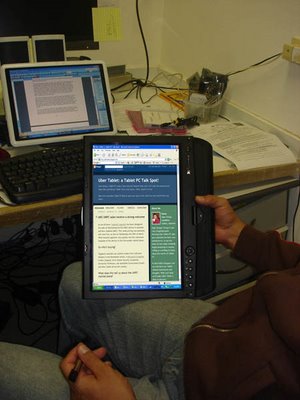


I love that the Gateway convertible connected when I needed to connect (both Bluetooth and WiFi) and gave me unmatched Tablet viewing pleasure via its 14� widescreen technology. I really enjoyed having an optical drive on the Tablet, a now rare occurrence by most vendors, and also enjoyed the jog dials and bush buttons located on the tablet screen.

In conclusion all I can add is this: �If tablet PC were an NGO (Non Governmental Organization), and I were Kofi Annan, then all of my votes would go to supporting the Gateway project called �lets take away the Wacom monopoly and give Tablet PC back to the people.�

Thumbs up, and praise, for developing a really great notebook that ships with Tablet features; thumbs down however for thinking that tablet PC users wouldn�t want a more effective form of inking. I'm praying that Gateway Tablet generation 2 or 3 will house a more acceptable inking format, therefore proving that the Tablet PC price point can close the gap on their more traditional notebook cousin.


Next week...Lenovo X41 review

What is Dr Neil holding?


We all know UMPC will be a project slowly consumed by the muscle of the mighty OEM. We also know that Microsoft is very interested in seeing this space grow and expand. What we didn't know however is that UMPC will soon be available in tangerine...hmmmm!

If you read Dr. Neil's post on using a UMPC you'll note that he doesn't actually mention the color or make of the UMPC; upon further investigation (view source) you'll quickly see, that by Dr. Neil's own admission, he announces a tangerine UMPC via an uploaded picture labeled as "tangerine_UMPC.jpg."

Wow...tell more Dr. Tell more!

See for yourself: [read more]