jeudi 30 novembre 2006

Another Hugo's Notes with Dr.Neil

Yesterday Dr. Neil Roodyn and I sat down and ripped another podcast. It's almost a habit now and locked in as part of our weekly routine. If we keep getting feedback and comments the way we have been it may well become irreversible- scary!

I must admit that this topic was fun and insightful for us both. The topic was nominated by Matt Propst on this thread on my blog, and as usual involved some banter and some conflict - in the name of the greater community. What I find amusing about these podcasts is just how naked you become, even a friend of mine comments on something I let slip.

So grab some of your favourite fairy bread and listen to our latest edition of Dr. Neil's Notes:

Dr. Neil's Notes 31

Welcome to Show 31 staring Hugo Ortega and Dr.Neil Roodyn

Welcome to another show:
Applications on the UMPC:
What we would like to see:

Happy Coding!

Any other topics you would like us to discuss? This podcast was recorded on a Samsung Ultra Mobile PC with Castblaster

mercredi 29 novembre 2006

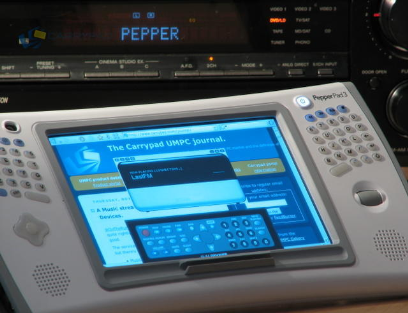
Carrypad does Pepperpad


Chippy has once again performed as expected - outstandingly. this time reviewing the Pepperpad device, unique in may ways, he has submitted thought and image that should keep you entertained for hours - or at least 10 minutes anyway.

The review starts with this comment "The Pepperpad 3 is your Google-life companion!" and ends there too "The Pepperpad is an absolute pleasure to use as a sofa or bed surfing device. As a 'Google-life' pad it works wonderfully and if this style of thin and web-based computing takes off,"

I always appreciate the efforts Chippy goes to so if you get a moment head on over a have a looksy! Here are some of the thoughts I liked:

Real-World performance.
In the world of browsing the web and listening to music you don't really need much in terms of performance. Because there is no heavy weight graphical windowing system, all the applications start and run just as fast as you might expect them. If the Pepperpad has many applications open, you do start to see some slowing down but this is rare.

Heat and noise.
This section is easy. No noise and only a little warming after extended use. (Watching a video for example.) Very very nice.

Security
Security is minimal on the Pepperpad because from a network point of view there is nothing to attack. Attacks through http pages should be very minimal and so I don't regard the lack of firewall or anti-virus solution as a risk.

Pepper support and community.
Here's an area the Pepper seem to have a good handle on. Their support process is very easy and pro-active. If you have a problem, you can submit a report via the Pepperpad itself or via a telephone hotline. Engineers and product managers always seem to be around in the Pepper forum too. Not only that but there are plenty of other users in the forum that are happy to help.

Permanent Mobile Tech Roundups (hyperlink)

Being part of Tablet PC in 2006 has been a true highlight. I've met new friends and learnt a lot - and shared a little too ;-)

I wanted to let you all know that I have placed a permanent link to the Mobile Tech Roundup gang: James Kendrick (Houston), Matt Miller (Seattle) and Kevin C. Tofel (Philadelphia). I just love what these guys do and I want to permanently recognize their efforts. Thank you boys!

Permanent Ink Shows (hyperlink)

I am very selective about who I link to and where I get inspiration; so I'll make this short. I have placed a permanent link to The Team and GottaBeMobile and specifically their Ink Shows. The link will now appear, forever more, under the "Sites Hugo follows".

Thank you WC, Rob B, Denis and Matt. Your efforts push me past my comfort zone, and open my eyes often! I'm a big fan...

Samsung Q1 Organiser Pack Strikes Back

I just love how much passion everyone has put into my Q1 vs.Q1b article. I expect that thread to grow, and if anything it will become highly resourceful leading up to more VIA based releases.

Tonight I want to give you an update that I only realized recently. Two weeks ago I was lucky enough to be given a Samsung Q1 by Samsung Australia, with the lovely inclusion of the Organizer Pack [USB Keyboard and Leather Organizer]. Admittedly I was not as enamored with the Q1 when I met it in July this year as I am today (more on that in another post).

Today I want to share a development that we all might have overlooked, and it�s not PCB specs, but rather about a BAG! It seems that Samsung is being highly proactive, so much so that they have already reworked their Organizer Pack. How do I know this? Well, Dr. Neil, my good mate, came home from Redmond earlier this year with a Samsung Q1 and Organizer Pack. Not only were we both immediately taken by the shear practicality of this combo, but the benefits of owning a UMPC were now starting to become very obvious too. The only thing it needed was good battery life!

Dr. Neil proceeded to pull out his 6-cell battery (nice) but we both realized that the Organizer Pack was poorly designed and could not even accept both Q1 and extended battery at the same time. At that moment in time, 5 months ago perhaps, the Organizer Pack (OP) had a fault in it that did not allow the Q1 with Extended battery to be docked at the same time � futile I know! What was the point!!! Both Neil and I lamented the experience and past it off as another fuck up learning opportunity for Samsung.

5-months later and I have sat with my 3-cell battery, Q1 and Organizer Pack for 2 weeks and lamented the fact that my 6-cell could not be used in conjunction with my OP. UNTIL, I try it, that is!

To my surprise, and sheepish shock, it actually does fit. I called Neil; we compared OPs, and realized that Samsung, as one of the most proactive UMPC hardware developers in the world, had realized their mistake and reworked the bag. So this has been a rather long-winded way of giving Samsung a pat-on-the-back. I felt it was important to point it out as the Organizer pack is one of the compelling reasons to get involved with UMPC today.

I chose to outline the benefits of the OP here, my mate James Kendrick pointed it out here, and Denis Rice cleverly saw what I saw many months ago � that the Q1 lacks the Cursor joystick � on this video, which by the way is a non issue now with the advent of the Organizer Pack. Interesting.

Photographic proof:


Q1 with New OP sporting 6 cell


Close up 6 cell nicely in new OP


OP with 3 cell


Dr. Neil's CD Carry Case Q1 Carry Case.

Linda Legend's List for Santa

Now many of you follow the Tablet PC MVPs with passion and vigor. On this occasion I'd ask that you follow on over to MVP Linda Epstein and view her TabletPc2.com 2006 List for Santa.

This is an annual event that Linda puts A GREAT DEAL OF EFFORT INTO. Not only does she get all "Christmassy" but she also manages to keep the entire affair very "Geekish," and we all like that don't we!

So without further delay Linda Legend spreads Christmas Cheer here, Tablet PC cheer here, Ultra-Mobile PC cheer here, and much more:

Good Job Linda, so much effort, so great!

mardi 28 novembre 2006

Q1 vs Q1B

When looks can deceive


Today I thought it important to define a "couple" of differences between the Samsung Q1 and the Samsung Q1b. At first glance they appear the same device with the later containing "b" generation benefits. While this holds true for a couple of the specifications it does not hold true for all. Because one of the most common questions I get asked at the moment is, "when will the Q1b become available Downunder?" I thought I'd help you all understand the differences.

So before we get too excited about Q1B lets look at the differences between the two...and it might interest you to know that the price should be "about" the same.

Processor:

Q1: Intel� Celeron� M ULV (900MHz)
Q1b: Via C7 ULV 1.0 GHz (Ultra Low Voltage) VIA Processor (Slightly faster than above, and slightly better battery life) [Update 28.Nov.2006: VIA Processor is in fact slower that the Intel Celeron. See comments below for more info.]

The Screen:

Q1: 7" WVGA Touch Screen
Q1b: 7" WVGA Touch Screen (280 nits, 800 X 480) (Brighter Screen)

Chipset & Graphics:

Q1: 915 GMS Intel, GMA900 (128MB)
Q1b: VX700 Integrated (I'm not sure on the technical difference here, anyone???) [Update 28.Nov.2006: C/O Long Zheng, VX700 here]

The Speakers:

Q1: 2 Stereo Speakers (4w total), H/P out, Array Microphone and SRS Sound
Q1b: One Mono speaker (2W total), H/P out, and SRS Sound (Ouch...yuk)

Connectivity:

Q1: 802.11 b/g, 10/100 Base-TX Ethernet, Bluetooth� v2.0,USB 2.0 Data cable
Q1b: 802.11 b/g, Bluetooth� v2.0 (NO ETHERNET)

I/O Ports:

Q1: 2 USB (USB 2.0), 1 Type II CF card, H/P Jack, VGA, DC-In
Q1b: 2 USB (USB 2.0), H/P Jack, VGA, DC-In (No CF Slot)*

Optical Drive:

Q1: Nothing
Q1b: (Included)

  • 3 External Drive choices w/Power DVD and Nero Express Software included
    24x CD-RW/DVD Combo Drive
    Ultra-thin 24x CD-RW/DVD Drive
    Super-Multi 8x DVD+/-RW Drive

Keyboard:

Q1: Nothing
Q1b: (Included)

  • Keyboard
    Ultra-thin notebook-style
    With mouse "pointing stick" and left/right mouse buttons built-in

*The CF (Compact Flash) Slot in Australia will be (hopefully) replaced by a HSDPA (i.e. Next G) enabled card...COOL!

By the way, this post was proudly brought to you by my shiny new Q1 with Organiser Pack!!!